How to Reprogram a Garage Door Remote: Step-by-Step for LiftMaster, Chamberlain, and Genie
To reprogram a garage door remote, press and release the Learn button on the opener motor once. Within 30 seconds, press and hold the button on the remote until the opener light blinks. That is the full process for most LiftMaster, Chamberlain, and Genie openers. If your opener predates the mid-1990s and has a row of small toggle switches inside the motor head instead of a Learn button, the section on dip-switch openers below covers you.
If your remote worked before but suddenly stopped, you may not need to reprogram it. Check your battery, confirm the opener is not in lock mode, and read through our remote troubleshooting guide first. This article covers starting from scratch: a new remote, a recently cleared opener, or one you have never programmed before.
When you need to reprogram a remote
- You bought a replacement remote or are adding a second one
- You moved into a home where the previous owner's remotes are still the only ones programmed
- You cleared the opener's memory after a move or a lost remote
- The remote lost its programming after an extended battery removal on certain older models
- You are setting up a HomeLink system built into a vehicle
Finding the Learn button on your opener
The Learn button is on the motor head, the housing attached to the ceiling. Look for a small round or square button near the antenna wire. On LiftMaster and Chamberlain openers it is color-coded: purple, yellow, red, orange, or green depending on the model and production year. Genie openers use a similar button, sometimes labeled Program rather than Learn. The button may be on the back of the unit or under the light cover.
If you open the light lens or the access panel and find only a row of small toggle switches and no button, you have an older dip-switch opener. Skip to the dip-switch section below. These are most common on openers made before about 1993.
How to program a LiftMaster or Chamberlain remote
LiftMaster and Chamberlain are made by the same company and use the same Learn button process.
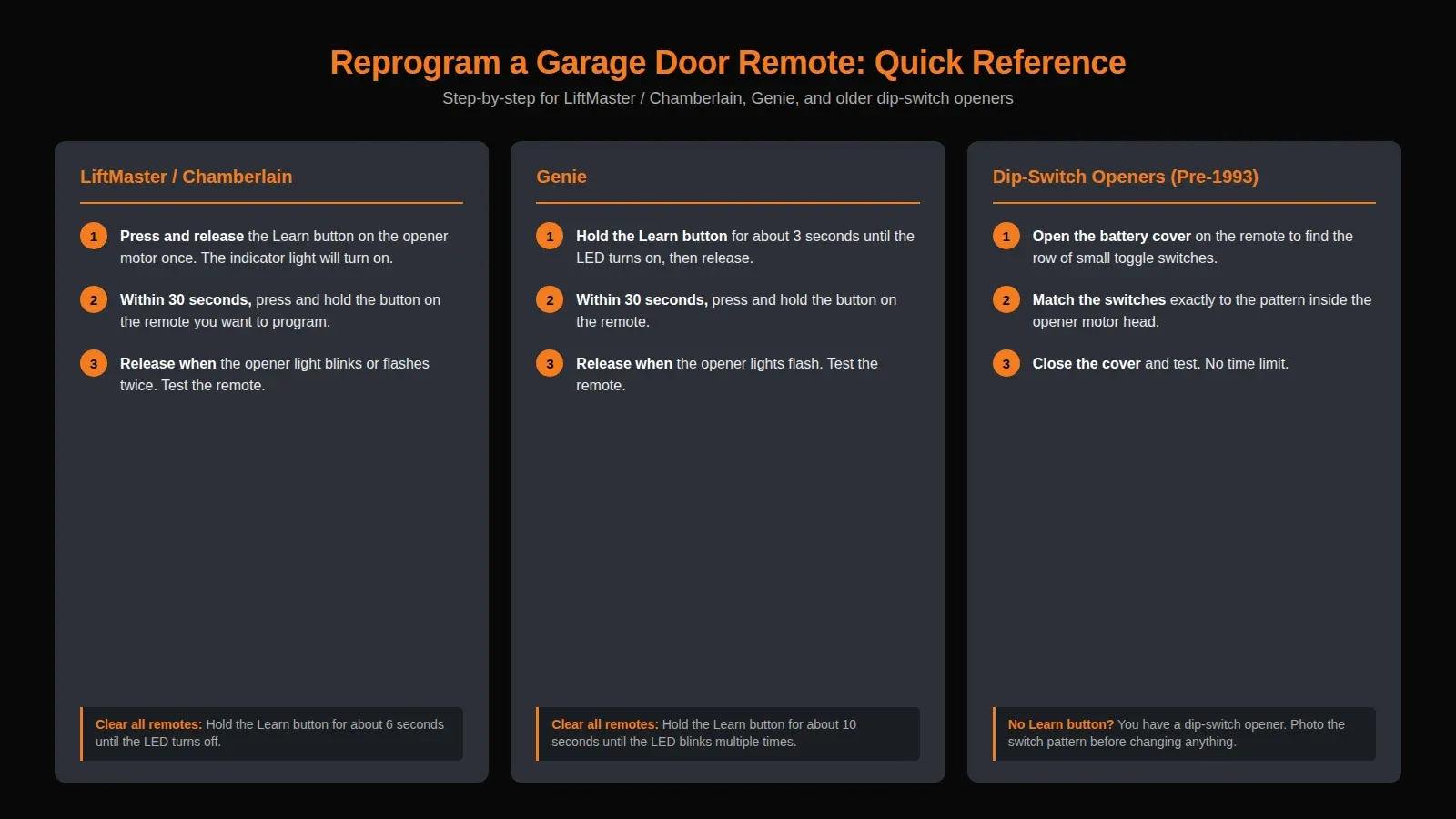
- Press and release the Learn button once. The indicator light near the button will turn on. You have 30 seconds.
- Stand within about 15 feet of the opener. Press and hold the button on the remote you want to use.
- Hold it until the opener light blinks or flashes twice. Release. The remote is saved.
If you are programming a HomeLink button built into a car visor, hold the HomeLink button and the remote at the same time with the remote about one inch from the HomeLink button, until the HomeLink indicator flashes rapidly. Then go to the opener, press the Learn button once, and return to hold the HomeLink button until the opener responds. Some older HomeLink systems need the rapid-flash step completed twice before the opener recognizes it.
How to program a Genie remote
Find the Learn button on the back of the Genie motor head, sometimes behind a small access panel. Press and hold it for about three seconds until the LED turns on, then release. Within 30 seconds, press and hold the button on the remote until the opener lights flash, then release and test.
Some older Genie Intellicode models use a variation. If the standard method does not work, try this: stand about five feet from the opener, press and hold the remote button for two seconds, release it, then press and hold it again for two seconds. If the opener responds, the Learn button press is not needed for that model.
If your opener uses dip switches
Older openers, those made before roughly 1993, do not have a Learn button. Inside the motor head is a row of eight or twelve tiny toggle switches. The remote has an identical row inside the battery cover. Both must be set to exactly the same pattern for the remote to work. There is no time limit and no button to press on the opener.
Open the battery cover on the remote, match every switch to the pattern on the opener board, then close the cover and test. Take a photo of the opener's switch pattern before you start so you have a reference. Replacement remotes for these models are still available but getting harder to find. If your opener is 25 or more years old, replacing it with a modern unit may be more practical than sourcing parts. See our guide on when to replace a garage door opener for the signs it is time.
How to clear all remotes from your opener's memory
You may want to erase every stored remote if you have moved into a home and do not know who has copies, or if you gave out spares to someone who no longer needs access.
On LiftMaster and Chamberlain openers, hold the Learn button down for about six seconds until the indicator LED turns off. All stored remotes are erased at once. On Genie openers, hold the Learn button for about ten seconds until the LED blinks several times.
After clearing, every remote that worked before will stop working, including your own. Reprogram each one from scratch using the steps above before you close the garage.
If the remote still won't program
If the Learn button light does not come on when you press it, check whether the opener is getting power. Garage outlets are often on a GFCI circuit with a reset button elsewhere in the garage or outside the door. Reset it, check the breaker, and try again.
If the button light turns on but the remote does not get a response, start with the remote battery. If the remote has its own indicator light and it does not come on when you press the button, the battery is almost certainly the problem. Program within about 15 feet of the opener motor, since range affects programming more than it affects everyday use.
Interference can block programming in some homes. Baby monitors, certain cordless phones, and some LED bulbs inside the opener's own light socket can flood the 315 MHz or 390 MHz frequency the remote uses. Try removing the bulb from the opener's light socket during programming, or move the opener's antenna wire away from metal tracks and rails.
If programming fails repeatedly and the opener is otherwise running normally, the receiver inside the motor may have failed. Our opener repair team tests and replaces receivers on most makes. We also carry remotes for current LiftMaster and Genie units, so if you just need a new one programmed, call us and we will handle it.
When to call a technician
Call when the opener has no Learn button and you cannot source the right dip-switch remote, the opener does not respond to any control, the door opens on its own after programming, or you have worked through every step above without a result. Any of those points to a problem beyond the remote itself, usually inside the opener or with the wiring.
If the opener is 15 or more years old and causing repeated problems, it may be worth talking through replacement. A newer opener adds smartphone control and rolling-code security that changes the signal every use. See our smart garage door opener guide for what current models offer.
Pronto covers Minneapolis and the surrounding Twin Cities suburbs seven days a week. Call or text (612) 400-4180 and we will usually be there the same day.
Garage Door Remote Reprogramming: Common Questions
How do I know which Learn button to press on my opener?
There is only one per opener. Look for a small colored button on the back or side of the motor head, sometimes behind the light cover. On LiftMaster and Chamberlain it is usually purple, yellow, red, orange, or green depending on the model. Genie openers use a plain button or one labeled Program.
Do I need to reprogram all my remotes after clearing the opener's memory?
Yes. Clearing memory removes every stored remote at once. After clearing, each remote, including your own, needs to be programmed again individually using the Learn button process. Plan to reprogram every remote you use before you close the garage.
Why won't my remote work after I changed the battery?
Most Learn-button openers keep their memory when the remote battery dies, so the remote should still work after a fresh battery. If it does not, reprogram it using the Learn button. Some older remotes lose their programming when the battery is removed for a long time, and a quick reprogram fixes it.
Can I use a LiftMaster remote on a Genie opener?
No. Standard remotes are brand-specific. A LiftMaster or Chamberlain remote will not program to a Genie opener, and vice versa. If you need one remote that works across brands, a universal remote is an option, but check the compatibility list before buying.
How many remotes can I store on one opener?
Most modern LiftMaster and Chamberlain openers store 10 to 20 remotes. Genie models vary by production year but typically support 10 or more. If you hit the storage limit, the opener usually drops the oldest saved remote when you try to add a new one.
Remote Still Not Responding?
Call or text (612) 400-4180 for same-day opener service across the Twin Cities, 7 days a week.